How to Build an HTML Email | Design Examples and Free Templates
May 3, 2026
Author: Shusaku Yosa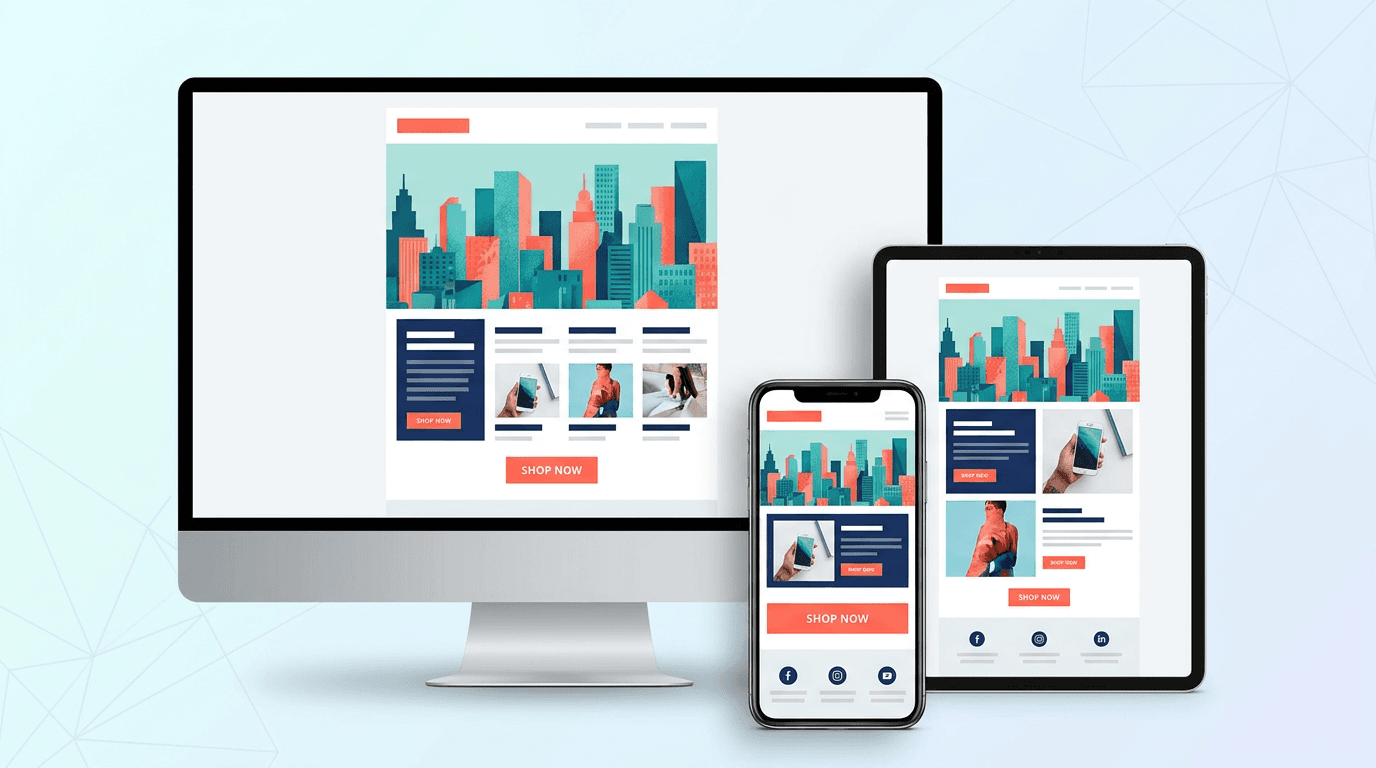
An HTML email is a rich-format email built with images, styling, buttons, and brand colors. It is widely used in business contexts—newsletters, promotional campaigns, transactional emails, welcome emails, and more. Compared with plain-text email, it has far stronger visual appeal, and its impact on click-through rate and purchase behavior is much easier to measure.
This article explains what an HTML email is, how it differs from plain text, a 5-step process for creating one, design examples by industry and goal, free templates and tools you can use, what you must watch out for to avoid the spam folder, and operational tips for lifting open and click rates—organized so you can apply it on the job. It is written for first-time HTML email senders as well as marketers who want to improve the performance of an existing program.
What Is an HTML Email? The Basics, Explained Plainly
Definition and key characteristics
An HTML email is an email that is styled and laid out using the same HTML (HyperText Markup Language) and CSS that power web pages. You can freely arrange text colors, fonts, images, buttons, and tables, and align the design with your brand tone. It is the format of choice whenever visual messaging drives results—email newsletters, campaign announcements, post-purchase thank-you emails, automated email-marketing flows, and more.
The biggest characteristic of HTML email is how easy it makes capturing behavioral data: opens, clicks, and conversions. Because you can track banner image clicks and the CTRs of in-body buttons, A/B testing and improvement cycles run smoothly, which makes HTML email a high-leverage digital marketing channel.
How HTML email differs from plain-text email
The differences between HTML email and plain-text email go far beyond visual freedom—they also include file size, deliverability, measurement capabilities, and operating costs. The main contrasts are as follows.
- Expressiveness: HTML email can use images, color, layout, and buttons; plain text can carry only words
- Measurability: HTML email supports open and click tracking, while plain text effectively does not
- File size: HTML email tends to be tens to hundreds of kilobytes; plain text is only a few kilobytes
- Spam filtering: HTML email can be flagged as spam more easily depending on its content, so design quality affects delivery rates
- Production cost: HTML email requires coding and design work; plain text needs only copywriting
In practice, the rule of thumb is to use HTML email for sends focused on brand experience, visual appeal, and CTR or revenue optimization, and plain text for system notifications and trust-critical transactional messages.
Why HTML email is still essential to marketing today
Even with the spread of social media and chat tools, HTML email remains a critical marketing channel for both B2C and B2B businesses. The reason is simple: email is one of the few owned channels where you can reach your audience directly, without depending on a platform algorithm. It does not depend on advertising spend, and it lets you build long-term customer relationships as a stock asset.
- Because email arrives 1-to-1, recipients open and read with greater focus than they give to social posts
- It pairs naturally with segmentation and personalization, making it a core CRM channel
- Measurement data accumulates easily, which is ideal for ROI visibility and continuous improvement
- Combined with marketing automation (MA), it supports scenario-based delivery aligned with each prospect's stage
How to Build an HTML Email in Five Steps
Step 1: define the goal, target, and KPIs
The starting point for an HTML email is not design or coding—it is articulating, in words, who the email is for, what it is meant to achieve, and what success looks like. Skip this step and you'll end up with emails that look fine but never move the needle. Write the goal in a single sentence, and connect it to a target KPI before you do anything else.
- Examples of goals: build awareness for a new product / drive traffic to a campaign / win repeat purchases from existing customers / re-engage dormant users
- Examples of targets: customers who purchased in the last 3 months / leads who downloaded a whitepaper but haven't met sales / by membership tier / by industry for B2B
- Examples of KPIs: open rate, click rate, CTR, conversion volume, attributed revenue, unsubscribe rate
Once goals and KPIs are clear, the direction of your subject line, the way you present the first view, and the design of the CTA button all line up coherently. In the entire build process, the first 30 minutes spent on this step matter the most.
Step 2: wireframe and copy structure
Next, sketch the structure and copy at a rough level. Readers skim from the top down, so the make-or-break moment is whether the first view (what's visible immediately after opening) communicates the benefit. A typical HTML email is a vertical layout, and the following structure is the standard.
- Preheader (the line shown next to the subject line in the inbox)
- Header (logo and brand elements)
- Hero visual and headline
- Body (benefit copy and supporting visuals)
- Primary CTA button
- Supporting content (related products, secondary CTA)
- Footer (company info and unsubscribe link)
On the copy side, prioritize using just three places—subject line, preheader, and first view—to fully convey both the reason to open and the value of reading on. Short headings, bullet lists, and a single focused CTA produce more reliable response than long explanatory paragraphs.
Step 3: code the HTML email
Once the wireframe is set, move on to coding. HTML email is not the same as a web page: each email client (Gmail, Outlook, Apple Mail, Yahoo! Mail, mobile apps, and more) supports very different subsets of HTML and CSS. The rule is to write it in the conservative "old-school" style intended for email, not the latest web standards.
- Use table-based HTML layouts (table, tr, td) instead of div + Flexbox
- Use inline CSS (the style attribute) rather than external or embedded styles
- Fix the width to roughly 600–640 pixels as a baseline
- Always include the alt attribute on images (the fallback text when images don't load)
- Prefer system fonts such as Hiragino, Meiryo, or Arial over web fonts—they're far safer across clients
A minimal HTML email built around a table layout looks like the following. Use it as a base you can copy and adapt.
unknown nodeStep 4: render testing across multiple clients
HTML email is a channel where "send first, fix later" is extremely costly. Before you broadcast, check how it actually renders in at least the major clients. Even just an internal test send catches the majority of unexpected layout issues.
- Desktop clients: Outlook (Windows), Apple Mail, Thunderbird
- Webmail: Gmail, Yahoo! Mail, iCloud Mail
- Mobile: iPhone Mail app, Gmail app, carrier mail apps
- Don't forget to verify dark mode rendering on iOS and Gmail
Paid testing platforms such as Litmus or Email on Acid let you check a far wider range of environments at once, but a test send to your own phone, desktop, and a few colleagues already covers most of the ground. Also confirm that the email still makes sense with images turned off, and that every link works as expected.
Step 5: send, measure, and improve
Sending is not the finish line. Treat measurement and improvement as part of the same loop, and your HTML email program becomes a compounding asset. After every send, record at minimum the open rate, click rate, conversion volume, and unsubscribe rate, and form your next hypothesis around three levers: subject line, first view, and CTA.
- Subject line: A/B test variations to compare open rate (benefit-led, question-led, number-led, etc.)
- First view: swap the headline, hero visual, and the position of the first CTA
- CTA: measure the impact of button color, copy, and number (one CTA vs. two)
- Segments: break down open rate by attribute and by behavior, then refine your audience
HTML Email Design Examples by Industry and Goal
B2C e-commerce and retail: visual-led layouts
For B2C e-commerce in apparel, beauty, food, and similar verticals, the standard pattern leads with a hero visual that conveys the brand world and arranges product cards in a grid. Visual impression heavily drives click-through, so photo quality, consistency, and a tightly controlled brand palette matter.
- First view: present the world with three elements—hero image, short headline, and primary CTA
- Middle section: lay out product cards in three or two columns, each with image, name, price, and a "View details" button
- Lower section: include reviews, social posts, and links to related categories to encourage further browsing
- Stick to two or three colors plus one accent color, and give the button strong contrast
B2B SaaS and services: information-led layouts
For B2B SaaS and services, clarity outweighs flash. Keep the hero visual to an abstract illustration or a key-color band, and structure the body around the flow problem → solution → CTA so it reads as a logical argument. The reader is a decision-maker scanning between meetings, so a layout that surfaces the key points on a single read works best.
- Subject and preheader: state the problem you address and the benefit of reading (e.g., "Three ways to cut billing operations by 8 hours a month")
- Body: large headings, short paragraphs combined with bullets, and brief glosses for jargon
- CTA: choose between "Download whitepaper," "Book a free demo," or "Read the case study" depending on the buyer's stage
- Sign off with the name and contact of an actual person to give the message a human face
Newsletters: editorial layouts
Weekly or monthly newsletters work best when they are organized like a magazine table of contents, presenting several topics in one issue. When you want to deliver multiple stories in a single email, structure it with an opening table of contents and clear section dividers so readers can choose what to read.
- Top of the email: list 3–5 highlights of the issue as bullets (jump links are a nice touch)
- Each section: heading + short lede + link to the full content, so readers can move through it quickly
- Close with an editor's note or a short column to give the brand a personality and deepen the relationship
- Keep the cadence consistent and number the issues in the subject line to create a sense of an ongoing series
Welcome and transactional emails: trust-led layouts
Welcome emails sent right after sign-up, and transactional emails such as purchase or booking confirmations, are touchpoints where reader expectations are high and open rates run unusually high. A restrained, trust-building layout that surfaces the logo, the registered details, and the next clear action is the right pattern.
- Place the logo in the header and state the purpose at the top of the body—"Thanks for signing up," "Your order is confirmed"
- Lay out registration details or order specifics in a table so readers can come back and check them later
- Offer a single next step (complete your profile / track your delivery / view the getting-started guide) as a single button
- Always include links to support and the return policy—remove any uncertainty
How to Choose Free HTML Email Templates and Tools
Where to find free HTML email templates
You don't have to code from scratch. Free HTML email templates are widely available and let you produce high-quality emails in a fraction of the time. The main sources are:
- Built-in templates from email service providers: Mailchimp, Brevo (formerly Sendinblue), HubSpot, and others ship free template galleries inside their products
- Open-source responsive templates: Cerberus, Email Framework, and similar projects on GitHub provide multi-client tested templates
- Other email/marketing platforms (regional or international) usually include their own free template libraries—check your vendor
- Design tools: the Canva and Figma communities host free email design templates (you'll need to export the HTML separately)
When you choose a template, always confirm three things: that it is responsive, that it has been tested in the major email clients, and that the CSS is inlined. Older templates can break in current versions of Gmail or Outlook.
Types of HTML email tools and how to choose between them
HTML email tools fall broadly into three groups: drag-and-drop editors, code-first tools with live preview, and tools that generate HTML from Markdown or a custom syntax. Pick one that fits your team's skill set, send volume, and operating workflow.
- Drag-and-drop: BEEFREE, Stripo, the Mailchimp Editor. Anyone can design without HTML, but you are bound by the tool's feature set
- Code-first: MJML, Foundation for Emails. Familiar territory for engineers and designers, with high-quality responsive HTML output
- MA / sending platforms with built-in editors: HubSpot, Salesforce Marketing Cloud, Marketo, Account Engagement, etc. A strong fit when CRM integration and scenario automation are part of the picture
When choosing, compare options on four axes: (1) integration with the email service you actually send through, (2) how template assets accumulate over time, (3) whether the operator is technical or not, and (4) your future plans for segmentation and automation. Holding to those four prevents wandering decisions.
What to watch out for when using a template
Even with a free template, some baseline customization to fit your brand and per-client testing are non-negotiable. Sending the template as-is creates a sender impression that feels off-brand and undermines the experience after the open.
- Replace the logo, brand colors, and fonts to match your own tone
- Replace every dummy image and link with the real production assets
- Make sure the footer carries your company info and an unsubscribe link compliant with applicable email laws
- Run a test send and verify rendering in at least three environments: Gmail, Outlook, and iPhone
Key Things to Watch Out for When Sending HTML Email
How to avoid the spam folder
Even a beautifully crafted HTML email is invisible if it lands in spam. Spam filtering is a holistic judgment by the receiving system, influenced by three things: technical setup, message content, and sending history. On the technical side, make sure sender authentication—SPF, DKIM, and DMARC—is set up correctly.
- Configure SPF, DKIM, and DMARC to reduce the risk of being treated as a spoofing attempt
- Avoid heavy use of "!", "★", "FREE", and unnatural mixes of case in subject lines and body copy
- Don't build the entire HTML email from images alone—keep a healthy balance of text and images
- Use your own domain in URLs, not unfamiliar shorteners
- Clean lists with high bounce rates, and exclude addresses with low engagement
Legal and compliance considerations
Most jurisdictions impose specific rules on commercial email (in Japan, for example, the Act on Specified Commercial Transactions and the Specified Email Act apply). Violations can bring penalties as well as serious brand damage, so put a checklist in place before you start sending.
- Opt-in: send promotional email only after explicit consent, and keep records of when that consent was obtained
- Sender identification: clearly state the sender's name, address, and contact (email or URL) in the message body
- Unsubscribe: place a clearly visible opt-out link and keep the removal process simple
- Cookies and analytics: properly disclose open/click tracking in your privacy policy
Accessibility and mobile optimization
More than half of HTML email opens now happen on smartphones, so mobile optimization is no longer optional—it is a baseline requirement. Tiny font sizes, hard-to-tap buttons, or layouts that fall apart with images disabled cost you readers immediately. At the same time, design for accessibility, not just for sighted users in ideal conditions.
- Set body copy at 14–16px or larger; ensure buttons have a tap area at least 44px tall
- Always include alt text on every image so the message still works when images don't render
- Maintain solid contrast between text and background—avoid pale, hard-to-read color combinations
- Verify the design in dark mode so logos and text don't disappear into the background
Operational Tips for Lifting Open and Click Rates
Earn the open with the subject line and preheader
The first hurdle is getting opened. The inbox shows only three things—subject line, sender name, and preheader—so you have to use that small window to make the reader feel "this is worth my time." Aim for around 20 characters in the subject line (longer in English, but still concise), and lead with a benefit or a concrete number.
- Benefit-led: "How we cut ad spend by 30%" — front-load the result the reader will get
- Number-led: "5 minutes to understand X," "What 300 customers have in common" — add specificity
- Question-led: "Are you uneasy about your current CPA?" — speak directly to the reader's problem
- Use the preheader as a complement to the subject line, not a repeat of it
Designing the first view and the CTA
Once the email is open, communicating the gist within the first view drives both click rate and bounce rate. Readers decide "keep reading or close" within one or two seconds, so place your main message and primary CTA as high in the layout as you can—above the fold whenever possible.
- One message and one primary CTA per send—don't try to cram in everything
- Use high contrast on the CTA button, and write the label as a verb plus a benefit
- Don't use "click here" for in-body links; spell out the destination, e.g., "Download the free whitepaper"
- If the email runs long, place a secondary CTA further down so you don't lose readers who scroll
Segmentation and personalization
Sending the same content to your whole list is the fastest way to plateau on open and click rates. Splitting your audience by attribute, behavior, or purchase cycle, and adjusting both the content and the subject line accordingly, lifts response sharply on the same list. Once you add a marketing automation tool, scenario-based delivery falls into place.
- Attribute segments: industry, role, membership tier, location, and other basic attributes
- Behavioral segments: recent pages visited, downloads, purchase history
- Lifecycle segments: new / active / dormant—change the message by the customer's phase
- Use merge fields to insert first name and company name so the email feels personally addressed
Measurement and improvement loops
Make the most of HTML email's biggest advantage: the ease of capturing data. Beyond the per-send open rate, click rate, and conversion count, the long-run knowledge comes from accumulating learnings on send timing, subject-line patterns, and segment-level response. Pairing this with a web analytics platform such as GA4 lets you visualize how email contributes to traffic and revenue.
- Apply UTM parameters to every URL using a consistent rule, so you can analyze traffic and outcomes by source
- A/B test one variable at a time—subject line, send time, CTA copy
- Check open and click trajectories at three points after sending: 24 hours, 72 hours, and one week
- Maintain a knowledge sheet that records the learnings of each send, and use it as fuel for the next round of hypotheses
Conclusion: HTML Email Wins on Design and Operations
HTML email combines real expressive power—images, styling, and buttons—with the quantitative discipline of measurable opens, clicks, and conversions. It is one of the most important marketing channels available today. The build process can be organized into five steps: define goals and KPIs, design the wireframe and copy, code with inline CSS and table layouts, test across multiple clients, and measure and improve after sending.
On the design side, the key is choosing the right layout pattern—visual-led, information-led, editorial, or trust-led—based on your industry and goal. Free templates and tools let you reach high quality with limited initial cost, but spam-folder defenses, legal compliance, and mobile optimization are non-negotiable. In the end, what produces results is not aesthetic alone—it is the operational discipline of testing the subject line, first view, CTA, and segmentation week after week. Use the five steps and design patterns in this article as a base, and revisit your email marketing program from the design phase up.